

Windows 11 25H2 and 24H2 share the same core operating system and system files. Moving an eligible, updated 24H2 PC to 25H2 mainly changes its servicing lifecycle and activates selected features previously held behind temporary business controls. Many visible improvements also reach 24H2 through monthly updates. The version number alone does not establish better performance, new AI hardware capabilities or freedom from compatibility issues.
Current status, checked 6 October 2026: 25H2 was released on 30 September 2025. This guide compares it with 24H2. For the newer annual release and its separate upgrade decisions, see our Windows 11 26H2 guide. Dates below use Microsoft’s current release-information table, rather than older launch predictions.
Windows 11 25H2 vs 24H2: key differences
| Area | 24H2 | 25H2 | What this means |
|---|---|---|---|
| Release date | 1 October 2024 | 30 September 2025 | Both are released versions. |
| Build family | 26100 | 26200 | Record the full build and installed update, not only the prefix. |
| Operating-system foundation | Shared core and system files | Same foundation as 24H2 | An eligible 24H2 PC uses a small enablement package. |
| Home/Pro family support ends | 13 October 2026 | 12 October 2027 | A 24H2 Home/Pro PC needs a supported destination sooner. |
| Enterprise/Education support ends | 12 October 2027 | 10 October 2028 | Enterprise and Education have different deadlines from Home/Pro. |
| Visible feature differences | Depend on monthly servicing, rollout and controls | Many features carried forward; selected managed controls end | Compare the actual feature and effective policy. |
| Speed and gaming | Depend on the device and workload | No universal percentage improvement established here | Measure comparable work before claiming a gain. |
The lifecycle dates come from Microsoft’s servicing table; the shared foundation comes from KB5054156. They apply to the listed ordinary releases. Enterprise or IoT LTSC has a separate lifecycle. A new support period runs from a release’s launch, not from the day you install it.
Home, Pro and Enterprise are editions; 24H2 and 25H2 are release versions. If you are also choosing an edition, our Windows 11 Home vs Pro comparison and Windows editions guide cover that different decision.
What is Windows 11 25H2, and how does the update work?
The “25” refers to 2025 and “H2” to the second half of that year. For eligible 24H2 devices, Microsoft uses the KB5054156 enablement package. Its prerequisite is KB5064081, dated 29 August 2025, or a later cumulative update. A restart completes the activation.
This explains why a PC can show 25H2 after a relatively small version update while looking much as it did beforehand. The preceding monthly updates already supplied much of the underlying code. Downloading missing prerequisites, restarting and validating applications still take time, so a small package is not a guarantee of a particular installation duration.
That package is specifically for 24H2. A PC on 23H2, an earlier Windows 11 release or Windows 10 needs the applicable full upgrade route and eligibility checks. Microsoft’s Windows release-cycle guidance also distinguishes annual feature updates from monthly security updates and optional non-security previews. An optional preview update is not the same thing as joining Windows Insider.
Which 25H2 features are already on 24H2?
Ask two questions when reading a feature list: “When was the code delivered?” and “What makes it available to this user?” Those questions give a more useful comparison than putting every announcement under a new version heading.
| Capability | 24H2 versus 25H2 | Check on the actual PC |
|---|---|---|
| Settings agent, improved Search, Click to Do and Explorer AI actions | 25H2 ends temporary enterprise controls for these previously delivered features. See Microsoft’s feature list. | Permanent policy, hardware, licence and staged rollout can still limit availability. |
| File Explorer and Task Manager refinements | Monthly improvements carry into 25H2. The September 2025 update documents changes on both build families. | Check installed servicing and the particular action or behaviour you need. |
| Wi-Fi 7 enterprise connectivity | Also supported on 24H2 with KB5065789 or later. See Wi-Fi 7 requirements. | Compatible laptop, certified driver and enterprise access point. |
| Policy-based inbox app removal | Current configuration guidance supports managed Enterprise/Education on 24H2 or newer. | Administrator opt-in; approved app list; supported environment. |
| WMIC and PowerShell 2.0 removal | 25H2 lacks these tools, but removal also reaches serviced 24H2. See WMIC and PowerShell 2.0 guidance. | Legacy scripts and explicit PowerShell 2.0 dependencies. |
| Settings backup and recovery tools | Capabilities are available across supported releases. See Windows Backup for Organizations and quick machine recovery. | Effective configuration, protected scope and a usable recovery route. |
Why two PCs can show different features
On a managed PC, a feature can be installed but held behind a temporary control. Installing an annual release can end that hold; it does not remove a permanent policy or supply missing hardware. Microsoft’s enterprise feature-control guidance explains this distinction.
For example, imagine two office laptops that both report 25H2. One has eligible Copilot+ hardware and the required licence; the other has neither. A third may have both but an administrator has disabled a capability. The version label matches, but the user experience need not. These are illustrative configurations, not devices we tested.
For a missing feature, record its exact name, Windows build, installed updates, hardware eligibility, account/licence and effective policy. Then check the feature-specific documentation. A missing button is an observation; it does not by itself establish that the annual update failed.
AI features: separate hardware, licences and privacy
Copilot+ PC describes a hardware class. It is not another name for the Copilot app, and installing 25H2 does not buy a Microsoft 365 Copilot licence. Microsoft publishes separate ordinary Windows 11 and Copilot+ requirements. If you are comparing processor architectures too, our Snapdragon vs Intel guide covers application and hardware checks.
Recall needs an eligibility and consent check
Microsoft describes Recall as a preview experience for supported Copilot+ PCs. Its requirements include compatible secured hardware, a 40 TOPS NPU, 16 GB RAM, 256 GB storage, sufficient free space, encryption and Windows Hello Enhanced Sign-in Security with biometric enrolment. An NPU specification alone does not settle eligibility.
Snapshot saving is opt-in. On managed commercial or education devices, Recall is disabled and removed by default. An administrator can allow availability but cannot independently opt a user into snapshot saving. Use Microsoft’s Recall management guidance when planning a business deployment.
Snapshots are stored and analysed locally, but “local” is not a blanket compliance guarantee. Microsoft documents filtering limitations and separate feedback or diagnostic handling in its Recall privacy controls. User-initiated snapshot export applies only to devices in the European Economic Area, subject to policy; see the regional export rules. Agree what is permitted for sensitive work before enabling it. Availability and acceptable use are different decisions.
Click to Do and document summaries have their own conditions
Click to Do has its own device and feature requirements. Some analysis and text actions run locally; selected web or Copilot actions can send content online. Available actions can also depend on applications, language, region and licensing. Check the action you intend to use rather than treating “AI” as one feature.
File Explorer’s Microsoft 365 document summarisation covers files in OneDrive and SharePoint and requires an active Microsoft 365 subscription plus a Copilot licence, as documented in the September 2025 update notes. A Windows upgrade does not supply that entitlement. For a useful pilot, complete a real authorised document task and record the account, file location and result.
Is 25H2 faster than 24H2?
There is no universal speed increase established by this comparison. Shared system files do not make every device identical, but they do make it misleading to describe 25H2 as an entirely new performance architecture. Drivers, application updates, power settings, background work and cumulative updates can change the result.
A practical comparison starts with the work you care about: opening the same large spreadsheet, joining the same meeting, compiling the same project or running the same game. Use the same hardware, app version, dataset, power mode and test conditions. Record the installed Windows build and driver versions, repeat the operation, and note failures as well as elapsed time.
Bring both systems to comparable servicing levels as far as practical before attributing a difference to the release. If an app or driver also changed, record that as a possible explanation. The worksheet below is designed to capture those confounding changes. It contains no benchmark results.
What about gaming and battery life?
Do not infer higher frame rates, better battery life or compatibility from the release label. Test the exact game, graphics driver, anti-cheat and hardware combination. Our Windows gaming comparison covers current Windows 10-to-11 benchmark evidence, hardware dependencies and a fair testing checklist; this page’s question is the narrower 24H2-to-25H2 change.
For battery testing, use the same brightness, power mode, network conditions and workload. A meeting with camera effects is a different test from browsing or idle time. Report what you measured and the conditions, rather than turning one run into a general claim about every older laptop.
Security and legacy tools need deliberate checks
A Microsoft Windows security baseline is a set of recommended configurations for administrators to test and apply. A published baseline does not mean every recommendation automatically becomes a default on every upgraded device.
Memory integrity/HVCI already has default-enablement rules for compatible clean Windows 11 installations and Secured-core PCs. It is not a universal new 25H2 switch. Microsoft’s memory-integrity guidance explains the hardware and installation conditions. Check the actual setting and driver compatibility rather than assuming the version number changed it.
Audit WMIC and PowerShell 2.0 before blaming the release
The older 25H2 feature overview says WMIC can be reinstalled through Optional Features. Microsoft’s newer WMIC removal notice, updated 29 September 2026, says it has been removed from supported Windows 11 releases and is no longer a Feature on Demand. WMI itself remains supported. Use the newer component-specific guidance when the documents disagree.
PowerShell 2.0 removal also began reaching 24H2 through August 2025 updates. PowerShell 5.1 and 7.x are unaffected by that removal. Check scheduled tasks, logon scripts and management tools for WMIC calls or an explicit PowerShell 2.0 dependency. Test the replacement command’s output, permissions and automation context; changing a command name is not a complete migration.
Similarly, the current inbox-app removal policy documentation covers managed Enterprise/Education on 24H2 or newer. It is administrator-controlled and excludes multi-session environments. The older release overview’s “25H2 and later” wording should not be used to claim that this management capability is now exclusive to 25H2.
Should you upgrade from 24H2 to 25H2 now?
First separate support urgency from compatibility. A PC may need a supported destination soon even if the newest release is unsuitable for one required workflow. Check Microsoft’s hardware requirements, the offered update, management policy and any applicable safeguard. Simply running an unsupported 24H2 installation does not establish upgrade eligibility.
| Starting situation | Useful decision | Evidence before approval |
|---|---|---|
| 24H2 Home/Pro near its support deadline | Prioritise an approved supported destination. 25H2 remains supported; evaluate 26H2 separately if offered. | Eligibility, critical apps/peripherals and an agreed recovery route. |
| 24H2 Enterprise/Education within support | Plan around the longer remaining deadline and the business need. | Pilot changed feature controls and actual workflows. |
| Already on supported 25H2 | Continue monthly servicing; do not reinstall it to unlock an unlicensed or unsupported feature. | Exact feature requirements, policy and patch state. |
| An older release or Windows 10 | Use the applicable full upgrade assessment. | Supported hardware, app/driver compatibility and deployment path. |
| A 26H1 or LTSC device | Follow that release/channel’s separate servicing guidance. | Installed edition, channel and supported route. |
If deciding between supported 25H2 and the newer annual release, use the 26H2 upgrade guide for that second decision. Keep the destination choice tied to your dependencies and its support lifecycle, rather than treating a larger version number as proof of a better fit.
Known issues: compare the patch as well as the version
Checked 6 October 2026; latest issue update 2 October. Microsoft’s 25H2 release-health page and 24H2 release-health page show several shared servicing issues. A problem that began after a cumulative update may affect both versions. “Stay on 24H2” is therefore not a reliable general remedy.
| Workflow | Originating update and status | What to establish |
|---|---|---|
| Apps using Windows AC-3 decoding | KB5124010 or later; confirmed, permanent fix pending. | Does the actual media operation use the affected decoder? |
| AVD hosts using FSLogix | KB5120998 or later; mitigated. | Applicable version-specific Known Issue Rollback, restart and existing-profile test. |
| Domain trust / Machine Identity Isolation | KB5124008 or later; mitigated. | Enforcement configuration, domain functional level and live authentication. |
| USB Audio Class 1.0 equipment | KB5124008; mitigated. KB5129195 partly addresses multichannel symptoms. | Exact device/audio mode; remaining symptoms and support guidance. |
| RDS instability | KB5124008; resolved by KB5129195 or later. | Install the fix and restart. Microsoft says no action is needed for earlier RDS mitigations before installing it. |
| Hyper-V Plan9 host shares | KB5124008; resolved by KB5129195 or later. | If the temporary policy mitigation was applied, follow Microsoft’s re-enable-policy guidance as well as installing the fix and restarting. |
| Teams/Outlook on some Arm PCs | KB5121003; resolved by KB5124008 or later. | Actual app, architecture and patch level before assuming a lasting architecture problem. |
The table selects dependencies worth checking; it does not claim every PC is affected. “Mitigated” differs from “resolved”, and neither replaces a test of the required workflow. Follow the current issue detail for the exact remedy. Avoid copying registry or security workarounds into a general upgrade checklist without understanding the affected configuration.
Microsoft’s safeguard-hold guidance explains why Windows Update may withhold an offer. An issue list alone does not establish that your device has a hold, and a missing public hold identifier does not prove that no restriction exists. Keep the observed update message with the device record.
How to update an eligible 24H2 PC to 25H2
- Record the starting state. Open Settings > System > About, or run winver. Record edition, release and full build. Check Windows Update history for the installed cumulative update.
- Prepare recovery. Verify the data you need to recover, access to recovery credentials and any BitLocker recovery key. Agree who owns recovery if a business device fails.
- Install prerequisites. KB5054156 requires KB5064081 or a later cumulative update on 24H2. Use the supported servicing channel and finish pending restarts.
- Use the offered, approved route. Open Settings > Windows Update. Install 25H2 if it is offered and approved for the device. On a managed PC, follow IT’s deployment policy.
- Verify work after the restart. Confirm the resulting version/build, then test the real apps, peripherals, authentication and scripts. Save outcomes and blockers before a wider rollout.
Avoid the wrong download: as checked on 6 October 2026, Microsoft’s generic Windows 11 download page supplies 26H2. Its download button is not a version selector for 25H2. Installation Assistant is an upgrade workflow, not inherently a clean installation, and it supports x64 rather than Arm. Use an authorised version-specific deployment channel when 25H2 is the chosen destination.
If 25H2 is not offered, check the starting release, servicing prerequisites, hardware eligibility, target-version policy and any safeguard. Do not bypass organisational controls or routinely disable antivirus to obtain the update. Check the security vendor’s supported version and use only an agreed mitigation when one is actually needed.
Recovery and rollback: establish what is available
Microsoft’s Go back guidance says the option is available in most cases for a limited period, usually ten days, when the required installation files remain. It is not a guarantee for every update or enablement-package installation. Check the device’s actual recovery options before relying on them.
| Operation | Purpose | Limit to check |
|---|---|---|
| Go back to a previous version | Return through an available version-rollback route. | Limited availability; later apps/drivers/settings changes can be removed. |
| Uninstall an update | Remove an eligible installed update. Microsoft’s uninstall guidance. | Some updates cannot be uninstalled; it is not a universal downgrade method. |
| Repair reinstall / recovery options | Repair the installed system through a supported route. Recovery options. | Repairing the current version does not itself select an older version. |
| Independent backup and agreed recovery | Recover the data/device state covered by the chosen solution. | Protected scope, recoverable copy, credentials and an exercised restore. |
A settings backup is not necessarily a full-device or file backup. A local snapshot is not protection against every storage failure. Record the recovery method, what it restores and the evidence that it works. If a recovery action removes recent security updates, revalidate patching and management before returning the PC to service.
A practical 24H2-to-25H2 comparison worksheet
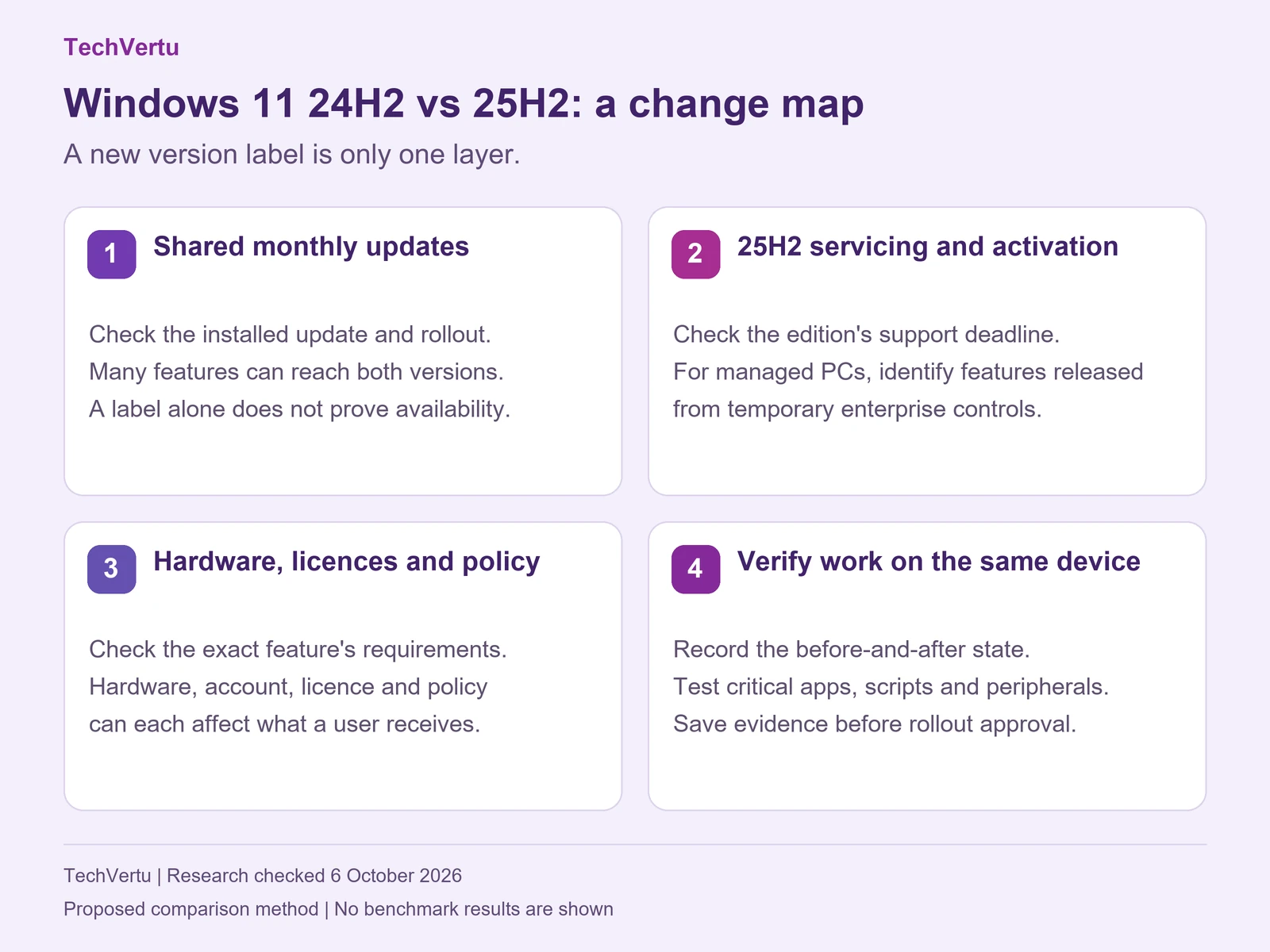
Use this record when deciding what changed, and whether a change matters. Complete a baseline while still on 24H2, then record the 25H2 result on the same representative device. If a driver, application, licence or policy changed too, do not silently attribute its effect to Windows.
| Gate | What to record or test | Approval boundary |
|---|---|---|
| Starting and resulting state | Edition/channel, build, installed KB, hardware and effective update policy. | An approved route and supported destination are identified. |
| Business application | Complete the same task with the same app/add-in, dataset and account. | Required output and authentication work; failures have an owner. |
| Peripheral and connectivity | Print, dock, reconnect VPN, use required audio and accessibility tools. | Required functions work after sleep/restart as applicable. |
| Scripts and security controls | Run scheduled tasks; validate WMIC/PowerShell migration and agent reporting. | Expected output and required security signals remain intact. |
| Feature attribution | Record hardware, licence, policy and rollout conditions for each claimed change. | A feature observation is distinguished from a documented promise. |
| Recovery and decision | Retrieve recovery keys; verify the selected restore route and outstanding blockers. | A named owner approves expansion only when required checks pass. |
Stop expansion if a critical workflow fails, a required security control is missing, or the agreed recovery route cannot be used. “Not tested” is a legitimate outcome and must stay distinct from “pass”. An update installing successfully is only the start of that assessment.
For example, if a payroll export fails after upgrading, record whether the application or scheduled task also changed and whether it called a removed tool. If audio fails, identify the exact device class, driver and originating KB. These examples turn a broad version complaint into a reproducible support record; they are not claims about customer incidents.
Download the editable 24H2-to-25H2 comparison worksheet (CSV). It provides ten suggested workflow rows with before/after state, owner, evidence, confounding changes, result, remedy and approval fields. Observations and approvals are intentionally blank.
Frequently asked questions
How this comparison was updated
This guide was substantially refreshed on 6 October 2026 using Microsoft’s release, servicing, feature, privacy, management and recovery documentation. The comparisons and worksheet are an editorial method for checking a real device, not firsthand performance tests or customer results. The original publication date remains 21 October 2025.
The refresh replaces release forecasts, unsupported speed and compatibility percentages, blanket AI/compliance claims and guaranteed installation/rollback wording. It also corrects older WMIC and app-removal guidance using newer component documentation. Known-issue statuses are a dated snapshot: check the live release-health pages before deployment.
Choose the update around the work you need to do
For a personal PC, that means a supported release, the apps and hardware you rely on, and a usable recovery route. For a business fleet, add an owner and evidence for each critical workflow. Bring the current edition/build, dependency list and observed failure to your IT team; that record is more useful than “25H2 feels different”.
To compare the prior release’s wider feature set, read our Windows 11 24H2 guide. To decide whether the next annual release is the right destination, read the Windows 11 26H2 guide. Keep those decisions separate from the evidence about what changed between 24H2 and 25H2.
Lets Talk!
If you have additional comments or questions about this article, you can share them in this section.