
Snapdragon vs Intel comes down to the exact laptop and the software you need. Shortlist Snapdragon for a mobile Windows workflow that passes your app, driver and recovery checks. Shortlist Intel when required software or hardware needs an x86 platform, or a particular Intel laptop performs better in your tasks. Neither brand wins every performance, battery-life or price comparison.
Research checked on 2 October 2026. This guide covers Windows laptop families, including Snapdragon C, X and X2, legacy Intel Core i7 and current Core Ultra. Manufacturer specifications and third-party tests are attributed below. The buying method and worksheets are our editorial synthesis; we have not performed the laptop benchmark tests cited here.
A processor is only one part of a laptop purchase. The useful question is whether the complete machine can do your work, away from a charger, at an acceptable total cost. This guide gives you a family map, explains the traps in “Snapdragon vs Intel i7”, and turns compatibility into a set of checks you can actually complete.
Jump to: processor families · Snapdragon vs i7 · compatibility checklist · battery evidence · gaming · development · AI requirements · business cost · FAQs
Snapdragon vs Intel: the quick verdict
| Your situation | What to shortlist | What decides the purchase |
|---|---|---|
| Browsing, Microsoft 365 and frequent travel | Both Snapdragon and efficient Intel ultraportables | Required apps, video-call battery trial, screen, weight and price |
| A business with specialist software, VPN or security agents | The platform supported by each required package | Exact versions, modules and driver support; an Intel option may avoid an unresolved ARM dependency |
| Competitive gaming or a gaming-first laptop | An Intel configuration with suitable graphics, or another supported gaming platform | The actual games, anti-cheat support, GPU and measured frame rates |
| Software development | Either platform after an architecture-aware check | Toolchain, containers, VM guests, native extensions and target architecture |
| Buying a low-cost or refurbished laptop | Compare exact generations and full specifications | Do not equate older Snapdragon 8cx or an old i7 with current X2 or Core Ultra |
Treat these as shortlisting rules, not a universal ranking. Intel’s long-established x86 software ecosystem does not make every old driver or app work on every new Intel machine. A Snapdragon laptop is not disqualified merely because one application uses emulation. The pass condition is a supported, tested workflow.
What changes when Windows runs on ARM?
Snapdragon Windows laptops use ARM processors; mainstream Intel Windows laptops use x86-64 processors. Windows looks familiar on both. The important difference is how the applications and their dependencies execute. Microsoft documents native ARM applications and x86/x64 emulation through Prism. Many existing applications can run, but user-mode emulation does not translate a kernel driver into an ARM driver.
Keep three questions separate: does the application launch, does the vendor support this configuration, and does the full task work? An app can open while a required plug-in, database connector, device utility or security component fails. An apparently successful trial can also leave you without a supported recovery route.
Old blanket claims about instruction support are unreliable. Microsoft’s current Prism compatibility documentation includes AVX and AVX2 support. Check the supported Windows build and application requirements instead of repeating an older “this instruction means ARM cannot run it” rule.
The Snapdragon and Intel laptop family map
The tables below decode the families you may encounter. They are not a tier-for-tier speed ladder. CPU cores, power ratings and NPU TOPS describe different things; you cannot turn them into a reliable overall ranking by adding them together.
Snapdragon families: C, X, X2 and older laptops
| Family | CPU examples and core counts | NPU specification / buying context |
|---|---|---|
| Snapdragon C | C1-10100 in Acer Aspire Go 15: 8 cores | Entry-level example listed with 8 GB RAM and 128 GB UFS; that configuration does not meet the 16 GB Copilot+ memory minimum |
| Snapdragon X | X1-26-100 / X1-26-101: 8 cores | Up to 45 NPU TOPS |
| Snapdragon X Plus | X1P-42-100: 8 cores; X1P-64-100: 10 cores | 45 NPU TOPS |
| Snapdragon X Elite | X1E-78-100 / X1E-80-100 / X1E-84-100: 12 cores | 45 NPU TOPS |
| Snapdragon X2 Plus | X2P-42-100: 6 cores; X2P-64-100: 10 cores | 80 NPU TOPS |
| Snapdragon X2 Elite | X2E variants: 12 or 18 cores | 80 or 85 NPU TOPS depending on the exact part |
| Snapdragon X2 Elite Extreme | X2E-94-100 / X2E-96-100: 18 cores | 80 NPU TOPS; the Extreme name does not mean the highest NPU figure |
X and X2 figures come from Qualcomm’s current laptop processor catalogue; they are manufacturer specifications, not measured application performance. UK stock, pricing and configurations depend on the laptop supplier. The Acer C example is a listed configuration, not a promise that it is in stock at your preferred retailer.
Refurbished and older devices may use Snapdragon 850, 7c/7c+, 8c/8cx generations or Microsoft’s SQ1, SQ2 and SQ3. Microsoft’s historical Windows 11 processor list (October 2025) documents these older names, but does not make their performance or feature set equivalent to X/X2. Check the exact model, Windows support and available drivers. Smartphone Snapdragon 8-series chips belong to a different comparison.
Intel families: Core i7, Core and Core Ultra
You will encounter legacy Core i3/i5/i7/i9, newer Core 3/5/7, and Core Ultra 5/7/9. Current Core Ultra Series 3 also includes X7 and X9 names. Intel Processor and N-series devices are a separate value category. Use Intel’s naming guide alongside its current Core Ultra catalogue: a familiar badge or “Series 2” label does not establish the same graphics, power class or NPU.
| Exact processor | Cores / threads | Processor base / maximum turbo power | NPU TOPS |
|---|---|---|---|
| Core i7-1355U | 10 / 12 | 15 W / 55 W | Not a 40+ TOPS NPU |
| Core i7-14700HX | 20 / 28 | 55 W / 157 W | Not a 40+ TOPS NPU |
| Core 7 150U | 10 / 12 | 15 W / 55 W | Not a 40+ TOPS NPU |
| Core Ultra 7 155H — Series 1 | 16 / 22 | 28 W / 115 W | 11 |
| Core Ultra 7 258V — Series 2 | 8 / 8 | 17 W / 37 W | 47 |
| Core Ultra 7 265H — Series 2 | 16 / 16 | 28 W / 115 W | 13 |
| Core Ultra 7 365 — Series 3 | 8 / 8 | 25 W / 55 W | 49 |
| Core Ultra X7 358H — Series 3 | 16 / 16 | 25 W / 80 W | 50 |
| Core 7 360 — Series 3 | 6 / 6 | 15 W / 35 W | 17 |
The linked Intel specifications describe processors, not measured whole-laptop consumption or battery runtime. Manufacturers set cooling and power behaviour for their machines. A 55 W processor base-power specification is not a statement that the laptop continually draws 55 W from its battery.
Snapdragon vs Intel i7: why there is no single answer
“Intel i7” could describe a used ultrabook, a recent thin laptop or a high-power gaming workstation. The i7-1355U and i7-14700HX above differ in generation, core configuration and power class. Comparing both with the same Snapdragon X Elite using only the i7 badge hides the question you need to answer.
First choose a device class: a light travel laptop, a general office laptop, or a machine for sustained creative or gaming work. Then compare named configurations in that class. A heavy HX laptop with discrete graphics and a large charger may be a sensible workstation, but it is a poor stand-in for an ultraportable in a battery-life contest.
Even a laptop-family name is insufficient. ASUS’s UK Zenbook A14 UX3407 specification page includes configurations with X1-26-100, X1E-78-100 and X2E-88-100. Ask for the full configuration code and CPU part in the quote. “Zenbook A14 Snapdragon” leaves substantial ambiguity.
- Record the exact CPU, laptop configuration code, RAM, storage and screen.
- Compare similar device classes and current UK prices on the same VAT basis.
- Use tests of the actual application, not a different benchmark with the same-looking score.
- Check plugged-in and battery performance separately, including the selected power mode.
- Confirm required software and peripherals before paying for extra CPU capability.
This also answers “Snapdragon X Elite vs Intel Core Ultra”: select the exact X Elite and Ultra parts, then the actual laptops. X Elite versus 258V is a different comparison from X2 Elite versus X7 358H. More cores across architectures do not automatically mean faster work.
A compatibility checklist that tests the whole workflow
Our proposed method: resolve critical compatibility gates before scoring speed or battery life. A weighted score can otherwise let a long battery runtime compensate for a missing VPN or recovery tool. Decide which dependencies are essential, what counts as a pass, and who owns the evidence.
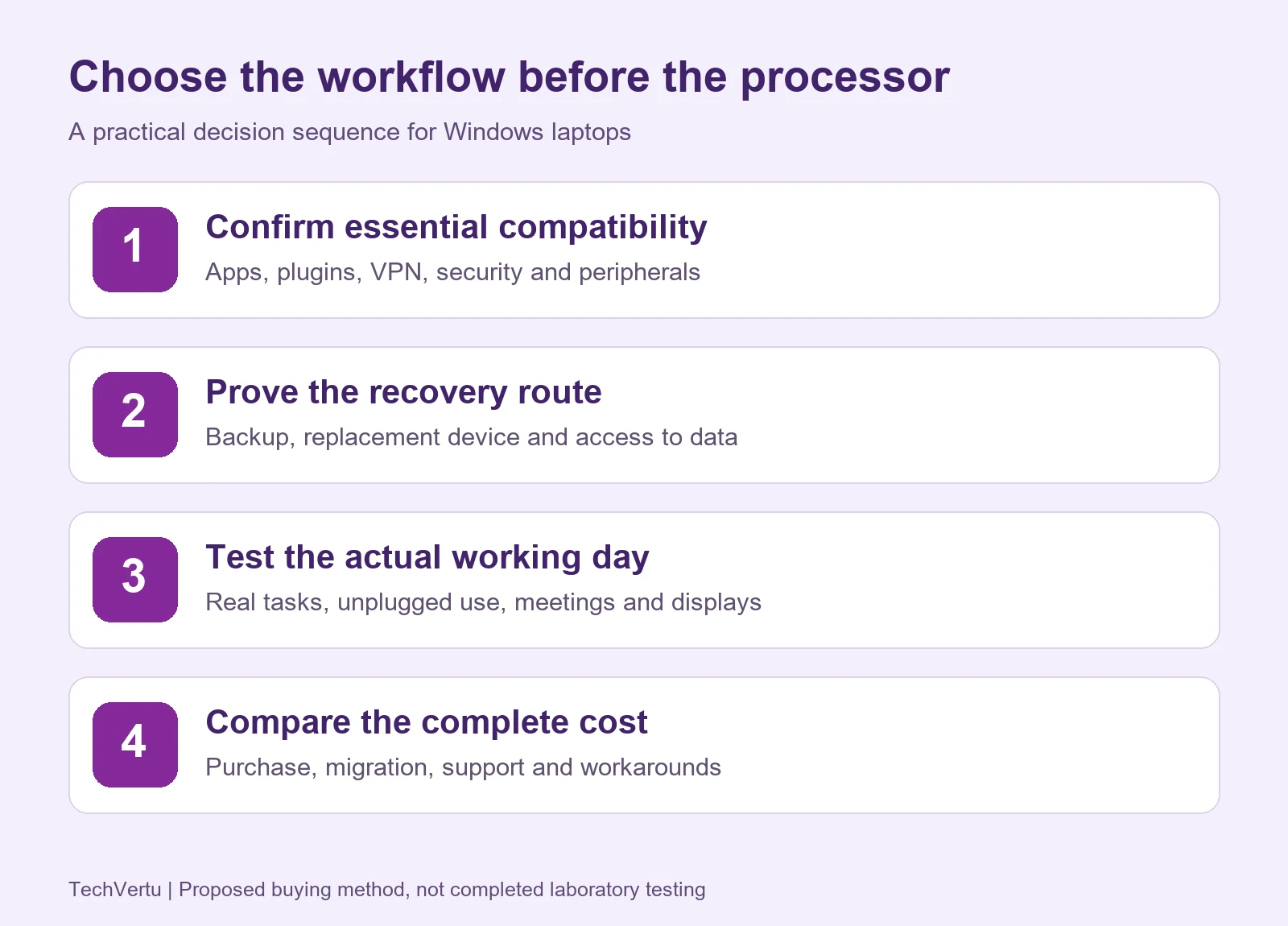
| Gate | Evidence to record | A useful pass condition |
|---|---|---|
| Critical applications | Version, installer, architecture, plug-ins and vendor support statement | Complete a real task with actual files, macros, connectors and export formats |
| VPN and authentication | Client edition, version, modules, gateway and authentication method | Pass MFA/posture checks; reconnect after sleep and a network change |
| Security and management | EDR, RMM, DLP, backup and deployment packages | Required controls report correctly; updates and remote support preserve enrolment |
| Peripherals | Exact dock, displays, printer/scanner, headset and drivers | Test charging, displays, printing, scanning, conferencing and resume |
| Development or games | SDKs, images, VM guest or game/anti-cheat versions | Run the actual build/test or supported game at your declared performance target |
| Recovery | Backup product, recovery media and replacement architecture | Demonstrate a supported recovery route and access to encrypted data |
| Mobility | Brightness, power mode, network and meeting workload | Meet your declared unplugged working-day target with acceptable responsiveness |
Use separate columns for vendor support and practical test outcome. “Supported but untested” is different from “confirmed and tested”; “blocked or unresolved” should remain visible. An emulated application can pass if the vendor supports it and the task works. For a critical unsupported dependency, do not treat a successful launch as sufficient.
Download the compatibility worksheet (CSV) and laptop comparison worksheet (CSV). They open in spreadsheet software and provide blank fields for your own evidence. The checklist is a proposed evaluation method, not a record of tests TechVertu has already completed.
A VPN example: the package matters as much as the name
Fortinet’s documentation makes this distinction concrete. FortiClient 7.4.7 managed Windows release notes list a limited ARM feature set including VPN, telemetry, web filtering and vulnerability scanning. The 7.4.7 standalone release notes list ARM processors as unsupported. “We use FortiClient” therefore does not settle the purchase: identify the edition, installer, version and required modules.
This is an example tied to those documents and that release, not a rule about all VPN products or future FortiClient versions. Ask your provider for the supported package and test the organisation’s real connection policy, rather than only connecting to a demonstration VPN.
Security, peripherals and recovery need separate checks
ARM is not generally excluded from business security: Microsoft Defender for Endpoint requirements explicitly support Windows on ARM. Other products and individual modules need their own checks. Our Windows 11 antivirus guide explains the wider protection decision; architecture support is an additional purchasing question.
Microsoft’s Windows ARM PC FAQ explains printer and peripheral support, including Mopria-compatible printers. Basic printing is not the same test as scanning, secure release, a manufacturer’s utility or a specialised driver. Include the exact dock and displays too: successful USB charging alone proves little about the rest of the desk.
Recovery can expose a different failure. Acronis’s supported-environments documentation describes its ARM agent and feature differences, and states that disk-backup recovery across ARM and non-ARM architectures is unsupported. This is product-specific. Your test should establish how you would restore on the replacement device you actually plan to use, not merely that a backup job turned green.
How to compare performance without misleading yourself
Choose a task, an output and an acceptable time. For office work, that might be opening your largest spreadsheet, recalculating it with the required add-ins, sharing it in a meeting and exporting the result. For creative work, use the same project, codec, application version and export settings. For development, use the same repository, dependency versions and build target.
Record whether each app is native or emulated, but measure the task rather than assigning an invented emulation penalty. CPU rendering, GPU acceleration and memory pressure can change the result. A fast CPU cannot fix an unsupported plug-in, and a benchmark using a native build is not proof that your older business application behaves the same way.
| Comparison detail | What to disclose |
|---|---|
| Machine | Exact laptop, CPU, RAM, storage, graphics and firmware |
| Software | Windows build, application version, architecture and project |
| Conditions | AC or battery, power mode, display brightness and background workload |
| Result | Task completion time, output quality, noise/heat if measured, and repeated-run variation |
| Limit | Whether another configuration, driver or app version could change the conclusion |
For sustained jobs, repeat the test after the laptop has warmed up. For mobile work, repeat it unplugged. Where a review does not disclose an important setting, treat it as missing evidence rather than silently assuming identical conditions. This guide does not present a fabricated 2026 X2-versus-Series-3 benchmark ranking.
Battery life: a real counterexample to the brand shortcut
Snapdragon is worth considering for mobile work, but “Snapdragon always lasts longer” is not a purchasing rule. Runtime depends on the complete system and workload, including battery capacity, panel, brightness, networking, software and power management.
| Notebookcheck test configuration | Recorded WLAN runtime |
|---|---|
| Surface Laptop 7 15, Core Ultra 7 268V; 32 GB RAM, 1 TB SSD, Windows 11 Pro; March 2025 review | 17 hours 41 minutes |
| Surface Laptop 7 15, Snapdragon X Elite X1E-80-100; 16 GB RAM, 256 GB SSD, Windows 11 Home; February 2025 review | 14 hours 49 minutes |
Both tested machines had 64 Wh batteries and the same 15-inch 2496 × 1664 panel family. The Intel review describes WLAN testing at 150 cd/m². RAM, storage, operating system and test dates differed, so these are near-matched systems, not an isolated measurement of CPU efficiency. The useful conclusion is narrow: the Snapdragon badge alone did not guarantee the longer runtime in these tests.
For your shortlist, define a working-day trial before testing: the same brightness, Wi-Fi, power mode and meeting workload on each device. Include your external display and dock when that is how you work. Decide the minimum useful unplugged duration and whether the laptop must remain responsive near the end. Video-loop marketing figures do not answer that question.
Gaming: check the game, anti-cheat and graphics
ARM gaming support is title-specific. Epic officially supports Fortnite on Windows 11 ARM Snapdragon devices, while Riot’s current VALORANT requirements explicitly exclude ARM. An “anti-cheat games never work” claim is therefore too broad, and a Fortnite success does not establish support for every other title.
For each game you care about, confirm current support and then look for frame-rate and stability tests on the exact laptop configuration. Integrated graphics, graphics drivers, resolution and settings matter. A game launching successfully is not the same as maintaining your target frame rate through a real match.
For a gaming-first purchase, a supported x86 laptop with an appropriate discrete GPU is often a more practical shortlist than a thin ARM office laptop. That is a workload recommendation, not proof that every Intel chip is faster. Check the complete graphics configuration and cooling, not just the CPU sticker.
Developers: match the tools and target architecture
Snapdragon can be useful for development. Microsoft documents ARM-native development tools and local ARM64 virtual machines, and WSL supports both ARM64 and x64 computers. WSL 2 is available on Windows Home; a developer needing Linux command-line tools does not automatically need Pro or an Intel CPU.
Containers require another check. Docker’s Windows installation documentation currently labels its ARM download Early Access. Docker’s multi-platform build documentation explains the distinction between ARM64 and amd64 images and emulation. Verify the backend, required images, native extensions and your organisation’s support policy before relying on a container workflow.
Use your actual project as the acceptance test: install dependencies, build, run tests, connect to local services, debug and produce the required release artefact. Include device simulators, VM guests and proprietary SDKs. If you need an x86 VM or a production-identical local environment, verify that exact toolchain instead of assuming application emulation provides it.
Architecture also matters when Windows runs inside a Mac virtual machine. Our guide to running Windows on a Mac covers that separate setup. A native Windows laptop and virtualised Windows on Apple Silicon are different deployment choices.
AI PCs and Copilot+: compare the right specification
Microsoft’s current Windows specifications define Copilot+ requirements beyond the processor badge: a compatible 40+ TOPS NPU, at least 16 GB of suitable memory and 256 GB of suitable storage, with additional feature requirements. Both Snapdragon X and qualifying Intel platforms appear in the published requirements. Region, language, software and device support can affect availability.
Do not compare total platform TOPS with NPU-only TOPS. Intel lists 47 NPU TOPS for Core Ultra 7 258V, but 13 for Core Ultra 7 265H despite its 97 overall TOPS figure. Core 7 360 lists 17 NPU TOPS. “Core Ultra”, “AI PC” and “Copilot+ eligible” are therefore different descriptions.
The Snapdragon family table contains another trap: X2 Elite NPU ratings vary by part, while an Elite Extreme name does not mean its NPU rating is the largest. An NPU’s peak TOPS figure is not CPU speed, and it cannot predict your AI task’s latency without knowing the model, precision, runtime and which accelerator the software actually uses.
Also separate local Windows AI experiences from Microsoft 365 Copilot service requirements. Accounts, licences, applications and connectivity remain relevant. Buying a laptop with a larger NPU number is not a substitute for checking the requirements of the service or feature you intend to use.
For business buyers, calculate the cost of the workaround
A lower purchase price can be attractive, but a recurring workaround can consume the saving. This is not specific to Snapdragon: any platform can create extra steps when it does not fit the workflow. Assess migration, support, subscriptions, peripheral replacement, warranty and repair turnaround alongside the device price.
Illustrative arithmetic only: suppose either shortlisted platform saves £150 per laptop across 20 laptops. The upfront saving is £3,000. Suppose a workaround then takes 10 minutes per user per week, for 46 working weeks, and you value staff time at £30 per hour.
| Calculation | Result |
|---|---|
| 20 laptops × £150 purchase saving | £3,000 upfront saving |
| 20 users × 10 minutes × 46 weeks ÷ 60 | 153.33 hours of additional time |
| (20 × 10 × 46 ÷ 60) × £30 per hour | £4,600 annual staff-time opportunity cost |
| £3,000 × 60 ÷ (20 × 46 × £30) | Break-even: about 6.52 minutes per user per week |
These assumptions are deliberately visible so you can replace them. Staff-time opportunity cost is not automatically a cash expense or recoverable cash saving. The example excludes migration, support contracts, extra subscriptions and replacement peripherals. Its purpose is to expose small recurring friction, not predict your organisation’s finances.
A mixed fleet can be reasonable: mobile browser-based users may pass an ARM pilot while a specialist department keeps a supported x86 configuration. Do not impose one processor brand on every role without checking dependencies. Define supported configurations and escalation ownership so the exception does not become an unplanned support burden.
If you need help assessing your software, peripherals and management requirements, TechVertu’s IT support services can provide a route to discussing the rollout. Make the scope of any assessment and testing explicit before purchasing the fleet.
Choose the Windows edition separately
The architecture decision does not choose Home, Pro or Enterprise for you. Our Windows 11 Home vs Pro comparison explains encryption management, company joining and remote hosting. For the wider edition landscape, see which Windows 11 edition fits your needs.
Pro does not turn an unsupported x86 driver into an ARM driver. Likewise, an Intel CPU does not grant every Microsoft business subscription. Confirm the actual Windows licence, feature requirements, management tools and service subscriptions as part of the quote.
A practical buying sequence
- List the essential tasks, exact apps, modules, devices and recovery requirements.
- Obtain exact laptop configurations and vendor support evidence for those dependencies.
- Resolve blocked critical gates before scoring speed, battery life or aesthetics.
- Trial the actual workload on battery and AC, with your desk equipment.
- Compare the full cost and support arrangement for the machines that pass.
- Record the decision, unresolved limits and triggers for retesting after major software changes.
For an individual buyer, a retailer’s return period may make a careful trial possible; check its terms first. For a business, a small representative pilot is more informative than giving one device to the least demanding user. Include somebody using the difficult application, the travelling employee and the person responsible for recovery.
The best purchase is the laptop that passes your requirements at a sensible cost. That may be Snapdragon, Intel or a different platform. The valuable result is a documented reason for the choice, with evidence another person can inspect.
Frequently asked questions
Is Snapdragon better than Intel i7?
Sometimes in a specific laptop and workload, but the names alone cannot answer it. Identify the Snapdragon part, the full i7 model and laptop configuration. Check compatibility, then compare the actual tasks, battery runtime and price.
Can Snapdragon run ordinary Windows apps?
Many native ARM apps and x86/x64 applications can run on Windows on ARM. Driver-dependent components and individual app packages need separate support checks. Complete the full workflow with the required plug-ins and devices instead of only launching the app.
Does Snapdragon always have better battery life?
No. Whole-laptop design and workload matter. The historical Surface tests above provide a counterexample, but do not establish a universal Intel advantage either. Compare the exact devices under the same useful working-day conditions.
Is every Snapdragon laptop a Copilot+ PC?
No. Check the complete requirements and exact configuration. For example, the Acer Snapdragon C configuration described above has 8 GB RAM, below Microsoft’s published 16 GB Copilot+ minimum. A processor-family name alone is insufficient.
Is Intel Core Ultra the same as Intel i7?
No. They are different naming families. Core Ultra also spans generations and different power, graphics and NPU configurations. Compare the complete part number rather than treating Ultra 7 as a direct match for every i7.
Should businesses avoid ARM laptops?
No blanket rule is justified. Use a pilot that verifies the required applications, security and management packages, VPN, peripherals and recovery. Keep unresolved critical dependencies out of a production rollout until a supported solution is established.
Can I use Snapdragon for software development?
Yes, when the required tools and workflow are supported. Check SDKs, extensions, container images, emulation and VM guest architecture using the actual project. Linux tooling through WSL does not by itself require Intel or Windows Pro.
Will Windows 11 Pro fix ARM compatibility?
No. Windows edition features and processor architecture solve different problems. Buying Pro does not provide an ARM version of an unsupported driver or application dependency.
Lets Talk!
If you have additional comments or questions about this article, you can share them in this section.