
IT infrastructure is the combination of hardware, software, networks, data services and operating processes that lets people use digital systems. Network technologies are the part that connects those systems: Ethernet, Wi-Fi, switching, routing and supporting services such as DNS.
The practical difference is simple: a network can connect your laptop to an application, but the application also needs working servers, storage, identity and permissions. This guide explains the components, how they depend on one another, and what to check before buying or changing them.
Technical definitions and source links reviewed on 8 October 2026. The architecture example below is illustrative, rather than a description of a particular company’s systems.
On this page
Decoding IT infrastructure
Think about a familiar task: opening a shared document. Your device needs a usable connection, the service needs to be reachable, your account needs permission, and the document must still exist in working storage. A failure anywhere along that chain can stop the task, even when the other equipment is healthy.
That is why an infrastructure inventory should describe relationships as well as list equipment. “We have two servers and a firewall” tells you much less than “the finance application runs on these servers, uses this database and needs this identity service.” The second description gives someone a starting point when the application fails.
What do you mean by IT infrastructure?
IT means information technology. IT infrastructure supplies the resources and services used to run applications, store information and connect users. It includes physical equipment, virtual resources, operating systems, networks and the facilities that support them. People, procedures and governance form the operating model around those resources.
Infrastructure is broader than a computer network. A network carries traffic; infrastructure also provides the processing, storage, access controls and recovery arrangements behind a service. Neither term describes a single product you can install and forget.
The boundary can vary by organisation. A laptop may be an endpoint in one inventory and part of the hardware estate in another. A database may be managed locally or purchased as a cloud service. Record the service and its owner either way: outsourcing the equipment does not remove the need to manage access, data and supplier responsibilities.
What is an example of IT infrastructure?
Imagine an office using cloud email, a local file server and a business application hosted by a provider. Employees connect through wired Ethernet or Wi-Fi; remote workers use an approved access method. The following example shows where each part fits.
| Component | Example in this environment | What it depends on |
|---|---|---|
| Endpoints | Laptops, phones and a shared printer | Power, supported software, configuration and access rules |
| Local network | Access points, switches and cabling | Coverage, working links, addressing and suitable capacity |
| Network edge | Router/firewall and internet connection | Provider service, routing and correctly configured traffic rules |
| Core services | DNS, address configuration and identity | Reachable services, valid records, accounts and certificates where used |
| Compute and applications | File server and hosted business application | CPU, memory, operating system and application dependencies |
| Data | Files, database and cloud documents | Storage capacity, permissions, integrity and recovery copies |
| Operations | Monitoring, maintenance and incident response | An owner, useful alerts, documented changes and tested recovery |
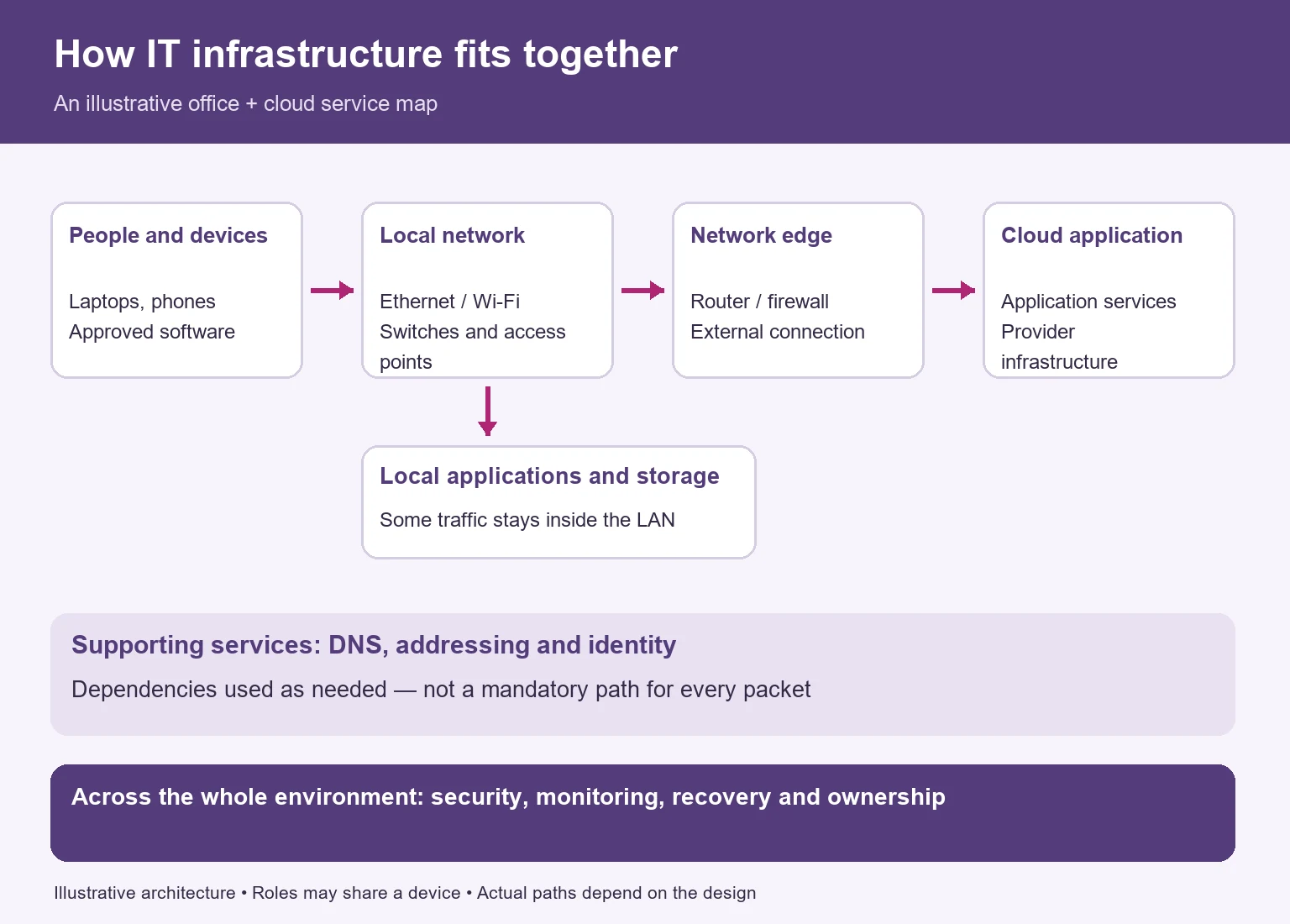
When an employee opens the hosted application, the device normally resolves its name through DNS, establishes a connection and signs in using the application’s identity arrangements. The application then reads or writes data using its own permissions. Cached DNS answers and existing sessions mean every step is not repeated for every request.
The connection to an office file server may stay inside the local network. Access to a public cloud application usually needs an external connection. DNS and identity are supporting dependencies, not boxes that every packet must pass through in sequence. This distinction helps prevent misleading network diagrams.
Facilities matter too: power, cooling, equipment security and suitable installation support the physical estate. Telecommunications and collaboration services use the network, while administrators manage accounts, changes and incidents. Policies establish who can approve those changes and who is responsible when a service fails.
For a closer look at hosted resources and responsibility boundaries, read our cloud technology explainer.

What are the seven components of IT infrastructure?
There is no universal rule that infrastructure has exactly seven components. A useful seven-part inventory is the following; it separates the things you need to own or manage without pretending the categories never overlap.
- Hardware and endpoints: computers, servers, storage equipment, printers and network devices. Record model, support status, location and owner, not just quantity.
- Software and platforms: operating systems, hypervisors, databases, middleware and applications. Include versions, licensing, dependencies and update responsibilities.
- Networking: switches, routers, access points, cabling, internet/WAN connections and virtual networks. Include DNS and address configuration in the service inventory.
- Data and storage: files, databases, storage services and retention arrangements. Classify important information and identify which systems hold the authoritative copy.
- Facilities and hosting: server rooms, power and cooling, colocation or cloud hosting. A cloud provider operates physical infrastructure even when customers never see it.
- Identity, security and resilience: accounts, permissions, protective controls, backups and recovery arrangements. These span the other categories rather than sit in isolation.
- People and processes: administration, supplier management, training, incident handling, change approval and documentation. Every important service needs an accountable owner.
The earlier three-, four- and seven-category descriptions often found in guides are different organising views, not competing technical standards. Use the level of detail that makes omissions visible. Cloud services, for instance, may supply compute, storage and networking together, so they do not fit neatly into one exclusive box.
What are the four categories of IT infrastructure?
For a simpler overview, group the estate into hardware, software, networking, and people/processes. Keep a separate record of data, security and recovery across all four. This view is useful for assigning responsibility, while the seven-part inventory above is better for a detailed audit.
Hardware infrastructure
Hardware includes endpoints, servers, disks, storage appliances and network equipment. Some resources belong to the organisation; others sit in a provider’s data centre. A virtual machine still consumes physical processor, memory and storage resources somewhere.
Servers run services for other systems; they are not necessarily large dedicated machines. Network-attached storage (NAS) commonly exposes files over a network, while a storage area network (SAN) provides access to block storage. Neither is automatically a backup. Capacity, performance, recovery and access permissions are separate questions.
Software infrastructure
Operating systems manage resources and provide services to applications. Databases organise information; middleware helps systems exchange it. Hypervisors host virtual machines, and management software configures or monitors the estate.
Track dependencies as well as licences. An application can fail because its database, certificate, integration or supported runtime is unavailable. Moving it to a newer server does not fix an unsupported application. Define who patches each layer and how a change will be tested and rolled back.
Network overview of IT infrastructure components
Networking includes the physical links and the logical configuration that makes communication possible. A cable connected to a switch is only the start: the device also needs appropriate addressing, routing, name resolution and permitted access.
In a small office, one appliance may act as router, firewall, switch and wireless access point. Those are distinct functions even when sold in one box. In a larger environment, the roles are often separated. Cisco’s networking basics provide an introduction to switching, routing and wireless access points.
Human resources and procedures
Assign owners for services, equipment and supplier relationships. Document how accounts are created and removed, who can change firewall rules, where recovery credentials are held and how incidents are escalated.
Training is part of this operating model. Staff need to recognise suspicious requests, use approved tools and report faults clearly. A procedure nobody can find during an outage is less useful than a short, accessible runbook with current contacts and recovery prerequisites.
What technologies are used in IT infrastructure?
The right mix depends on the work being done. A small organisation using mostly hosted applications does not automatically need a server room, SAN or container platform. These are common technologies and the problems they address:
| Technology | What it does | Important distinction |
|---|---|---|
| Physical servers and virtual machines | Supply compute for services and applications | Several VMs can share a host, so host failure can affect several services |
| NAS, SAN and cloud storage | Hold files, blocks or objects for different workloads | Storage availability is not evidence that recoverable backups exist |
| Hypervisors | Run separate virtual machines on shared hardware | Virtualisation alone does not make an environment a cloud |
| Containers | Package applications with their dependencies | Containers generally share a host kernel; they are not full VMs |
| Cloud services | Provide infrastructure, platforms or applications as a service | Service model changes the customer’s operational responsibilities |
| Operating systems and databases | Run workloads and manage structured information | Versions and application compatibility need lifecycle planning |
| Middleware and APIs | Connect applications and exchange data | Integration credentials and failure handling need ownership |
| Identity and endpoint management | Manage accounts, access and device configuration | A working network does not grant permission to every application |
| Security tools | Enforce or monitor protective controls | No single firewall or antivirus tool eliminates risk |
| Backup and recovery tools | Create and restore recovery copies | Successful backup jobs still require restoration checks |
| Monitoring and logs | Reveal availability, performance and security signals | Healthy hardware does not prove a user can complete a task |
| Communications and collaboration | Support calls, meetings, messaging and shared work | Network quality and identity can affect the user experience |
| Connected sensors and IoT devices | Collect measurements or control physical processes | Some operate locally; internet exposure is not required for every device |
Red Hat’s virtualisation overview explains the hypervisor’s role. If containers are needed, Kubernetes documentation describes orchestration: managing containerised workloads, rather than replacing every other infrastructure layer.
Cloud terminology needs similar care. IaaS, PaaS and SaaS describe service models; public, private, community and hybrid describe deployment models in the NIST cloud definition. A local server plus an unrelated SaaS subscription does not, by itself, establish an integrated hybrid cloud.
What are the three main areas of IT infrastructure?
Hardware, software and networking are a convenient technical shorthand. Use them to ask three different questions about the same workload: where does it run, what makes it work, and how is it reached? People, security and data management remain necessary across all three.
1. Hardware infrastructure
Ask whether the workload has enough processor capacity, memory, storage performance and physical support. Consider normal demand and busy periods, not just a vendor’s maximum specification. Identify shared resources: two applications may slow down together because they compete for the same host or storage system.
2. Software infrastructure
Ask which operating system, application, database and integrations are required. Record supported combinations and expiry dates for subscriptions or certificates. Establish what a working service looks like from the user’s perspective, rather than assuming a running process means the application is usable.
3. Network infrastructure
Ask which paths, protocols and access rules connect the user to the workload. Include remote access, provider links, DNS and identity dependencies. A network diagram should show boundaries and permitted connections; a service map should show the dependencies needed to finish a task. Both are useful, and neither replaces the other.
Is IT infrastructure crucial for business?
Infrastructure matters wherever work depends on digital services. The value comes from enabling a specific task reliably and safely, not from owning the most equipment.
Availability: staff need access to the systems that support their work. Redundancy can reduce the impact of a component failure, but shared power, configuration mistakes or supplier outages can still interrupt service.
Performance: an application must respond acceptably under real demand. More internet bandwidth will not resolve every slow application; a database bottleneck, congested Wi-Fi or excessive latency may need a different fix.
Data protection: access controls and backups help protect information and support recovery. They do not guarantee that data is always available or that unauthorised access is impossible.
Change and growth: capacity, supportability and clear ownership make it easier to add users or change systems. Extra licences, address space, equipment ports or application limits can constrain growth even when a cloud service offers elastic resources.
Cost control: purchases should address a documented requirement. Compare recurring subscriptions, support, connectivity, recovery, training and replacement costs alongside the purchase price. Our IT budget management guide discusses how to review spending in context.
How infrastructure and networking fit together
Use the architecture example above as a dependency map. When something fails, start with the scope: one person, one device, one site, one application or everyone? Then collect evidence before changing configuration. The following patterns suggest useful checks, not a guaranteed diagnosis.
| What the user sees | Where to start | What the observation does not prove |
|---|---|---|
| One laptop cannot connect; nearby devices work | Its connection, address configuration and device settings | That the entire network or provider is down |
| Wi-Fi works poorly but wired access to the same service works | Signal, interference, access-point load and wireless configuration | That more internet bandwidth is needed |
| Local resources work but several external services fail | External link, edge routing, DNS and provider status | That local compute and storage have failed |
| A service name fails to resolve | DNS answers, resolver reachability and relevant records | That the application server itself is offline |
| Sign-in fails but the application’s public page loads | Account state, identity service, MFA and conditional access | That connectivity alone gives the user permission |
| Only one application is slow | Its application, database, storage and integrations | That every slow response is a network fault |
| Equipment is healthy but users cannot complete a task | The complete service path and a user-level check | That hardware monitoring is enough |
During troubleshooting, keep timestamps and note which users, locations and services are affected. Avoid changing several layers at once: it becomes harder to tell which action helped. Hand sensitive logs and packet captures to authorised staff, because they can contain information beyond the immediate fault.
For ongoing checks, our IT infrastructure monitoring guide covers the monitoring layer. Link alerts to a named owner and a response procedure so a warning leads to a decision.
What are the five types of networks?
There are more than five network types. Five common labels are PAN, LAN, WLAN, MAN and WAN. Most describe geographic scope; WLAN describes wireless access within a LAN, so the labels can overlap.
| Type | Meaning | Example |
|---|---|---|
| PAN | Personal area network around an individual | A phone communicating with a nearby Bluetooth device |
| LAN | Local area network within a limited area | Computers and printers in an office |
| WLAN | Wireless local area network | Devices connecting to the office LAN through Wi-Fi |
| MAN | Metropolitan area network spanning a metropolitan area | Connections between sites across a city |
| WAN | Wide area network linking geographically separated networks | Connections between regional offices |
A VPN is a logical private connection over another network, while a VLAN divides a network into logical segments. Neither specifies geographic size. The internet is a global network of networks. Firewalls and security protocols protect or control communications; they are not geographic network types.
IBM’s computer networking overview discusses these different classification approaches. When choosing a design, describe location, access method, permitted traffic and ownership rather than relying on a label alone.
What are networking technologies?
Networking technologies include transmission methods, devices, protocols and supporting services. The following glossary distinguishes their jobs:
- Ethernet: a family of wired networking technologies, used over suitable copper or fibre links. The equipment and cabling must support the required speed and distance.
- Wi-Fi: wireless LAN connectivity based on IEEE 802.11 standards. It connects compatible devices to a local network; internet access depends on that network’s external connection. See the IEEE 802.11 working group.
- TCP/IP: shorthand for the internet protocol suite. IP handles addressing and packet delivery; TCP supports reliable transport. UDP is another transport, so not every IP connection uses TCP.
- DNS: the Domain Name System supplies records associated with names, including records that help clients find IP addresses. It is not an authentication service. Microsoft’s DNS overview explains its role.
- DHCP: Dynamic Host Configuration Protocol supplies address configuration to clients. In a typical IPv4 environment, this includes a leased address and options such as a gateway and DNS servers. See Microsoft’s DHCP overview. Static configuration also exists; IPv6 has additional mechanisms such as SLAAC.
- Switch: typically connects devices within a LAN and forwards Ethernet frames using learned MAC addresses. A Layer 3 switch can also route between networks.
- Router: forwards packets between IP networks. Its route configuration determines where traffic goes; a router does not inherently make an application faster.
- Wireless access point: connects wireless clients to a network. Coverage, client capability, interference and the wired uplink all affect results.
- Firewall: permits or blocks traffic according to policy. It may be an appliance, software or a cloud service. Rules and maintenance matter as much as the product name.
- VPN: creates a logical private connection over another network. Secure remote-access implementations use authentication and encryption; permissions still determine which resources a user may reach.
- Fibre optics: carries signals as light through fibre. It can suit long links or high capacity, but every organisation does not need fibre for every internal connection.
- VoIP: carries voice using IP networking. It can operate over private networks as well as the internet; delay, jitter and packet loss can affect calls.
- IPv6: the IP version specified in RFC 8200, with 128-bit addresses. It coexists with IPv4 in many environments; adopting it does not automatically make traffic faster or safer.
- SDN and SD-WAN: software-defined approaches to network control and WAN policy. They can simplify management, but need suitable underlying connections and sound configuration. Cisco’s SD-WAN FAQ explains the WAN approach.
Legacy Ethernet hubs repeat received traffic to other ports rather than making the forwarding decisions of a switch. They are useful to recognise in older diagrams, but are not the normal choice for a new office LAN.
How can a company build a successful IT infrastructure?
Start with the services people need and work backwards to the infrastructure. The aim is a supportable design with measurable requirements, rather than a shopping list of fashionable technologies. The checklist below can also be used to review an existing estate.
Assessment and planning
List critical tasks, users, locations and data. Identify each service’s owner and supplier, then map its dependencies. Ask how much interruption and data loss would be acceptable; these requirements guide recovery planning rather than promise a particular result.
Record current faults and collect a baseline before proposing changes. Check what is nearing the end of support, which licences are missing and which suppliers hold administrative access. Include a realistic operating budget and an exit plan for services that may later be replaced.
Scalable network architecture
Plan coverage, port capacity, addressing, routing and segmentation for expected demand. Guest devices, staff systems, servers and connected equipment may need separate access rules. A VLAN alone does not provide complete isolation: routing and enforcement between segments also matter.
If an outage would be costly, examine backup connections and equipment. Check whether two links share a physical route, building entry, power source or provider dependency. Test failover with an approved plan; owning two connections is not evidence that either will carry the required workload during a fault.
Robust security measures
Use layered controls: least privilege, appropriate MFA, supported software, timely patching, endpoint protection, secure configuration, segmentation and useful logs. Review administrative access separately from ordinary user access, including supplier accounts.
The NIST Cybersecurity Framework is a useful organising reference for risk management. NIST’s zero trust architecture explains why network location alone should not create implicit trust. Being on office Wi-Fi is not a reason to grant unrestricted access to applications or data.
Choosing hardware
Choose equipment against workload, compatibility and support requirements. Include warranty, spare parts, power, cooling and replacement arrangements. Check capacity headroom, but avoid treating the largest specification as the best value.
Virtualisation can improve resource use, while consolidation can create a shared failure point. Establish which workloads would stop if one host failed and what recovery requires. Do not claim cost savings without considering licences, management, backup and resilience.
Unified communication systems
Check that calling, video meetings and collaboration tools work with the organisation’s devices, identity and access arrangements. Assess call quality on the connections staff actually use, including remote locations.
Document what happens during a connectivity or identity outage. An alternative communication method may be needed to coordinate recovery. Adding another cloud application does not solve a shared dependency if both applications need the same unavailable sign-in service.
Data management and storage
Identify authoritative data, access permissions, retention and recovery needs. Keep backups appropriately separated from production access and test restoration. The test should include credentials, configuration and application requirements, not just whether a file can be downloaded. The NCSC’s ransomware-resistant backup principles provide guidance on protecting recovery copies.
Redundancy keeps a service operating through some failures; backup supports recovery from loss or unwanted changes. RAID, synchronisation and replication can spread accidental deletion or corruption, so they are not substitutes for a considered backup plan. Recovery time also includes rebuilding dependencies and validating the result before people resume work.
Scalable software solutions
Choose supported software that fits the workflow and integrates with the required systems. Check user limits, APIs, export formats, licence terms and the skills needed to maintain it. A difficult exit can be a significant cost even when the subscription is inexpensive.
Agree how updates will be tested, deployed and reversed if necessary. Record owners for database upgrades, application changes and certificates. Cloud providers manage some layers, but the exact responsibility boundary depends on the service and contract.
IT support and maintenance
Monitor service availability alongside capacity and security signals. Use a small set of meaningful user-level checks: can an authorised user sign in, open the required information and complete the task? Have a response procedure for each important alert.
Schedule maintenance with rollback and recovery prerequisites ready. Keep diagrams, inventories and contacts current after changes. Our proactive IT support guide explains the operational approach; the server maintenance duration guide explains why work time and user downtime can differ.
What to take away
IT infrastructure supplies the resources and services behind digital work; network technologies connect them. A useful design makes those relationships visible, assigns owners and checks the whole service from the user’s perspective.
Before the next purchase, ask: which task or failure does it address, what does it depend on, who maintains it, and how will recovery be demonstrated? Clear answers are more useful than a fixed number of components or a promise that any one technology guarantees uptime, security or lower costs.
Lets Talk!
If you have additional comments or questions about this article, you can share them in this section.
Very useful information. Partnering with a reliable provider of IT infrastructure management services ensures seamless monitoring, maintenance, and scalability for modern enterprises.
https://advanzit.ai/
hallo,i wtoent to register if you have basic IT course . just send your course link via E-mail
Hi there
Unfortunately, we don’t provide IT courses at the moment. You can sign up to our newsletter in order to stay informed with IT news and insights.